Development Environments and Workspaces
Introduction
This module covers the physical aspects of environments and workspaces in which software is developed. These physical aspects include the work environments, such as buildings, offices, rooms, etc., as well as the equipment used for development, such as user workstations and servers that are used for development, test, and production.
Concepts
Under Agile-based development methodologies, it is preferable the teams be co-located. Under traditional approaches, such as waterfall, this may be beneficial but has less importance.
- Agile teams benefit from smaller shared spaces, such as all team members co-located in the same room
- Such rooms should facilitate both individual development, while fostering collaboration among team members
- Under traditional approaches, meetings are frequent, requiring corresponding meeting spaces and/or virtualized meeting environments
Traditional Approaches to Software Management include Projects are Managed by Managers
- The different teams in a Waterfall project are typically managed by one or more managers (may or may not have technical expertise)
- Project managers may also be used (may or may not have technical expertise)
- It is common for managers to have separate offices
Large Projects May Require Multiple Environments
- Development
- Test
- Production
- Combinations of Dev/Test/Production
Workspaces
Historically, people working on software development worked in workspaces similar to other business professionals, such as engineers. These workspaces include individual offices, cubicles, and a sea of desks (now referred to as open space, noting there are historical differences). They are still in use today, although advancements in design and management thinking has lead to the deployment of more work-friendly environments.
The importance of workspaces cannot be understated. People are the most important element of any software development effort, and good workspaces enhance the enjoyment of the work environment, while poor workspaces tend to lead to disgruntled employees.
###Cubicles
Cubicles are used extensively in mid to large software development organizations. Cubicles offer several advantages relative to individual offices, including significantly lower cost, ease of reconfiguration, and commonality (everyone treated equally). Cubicle walls may have various heights, with higher walls providing greater privacy and lower walls generally costing less.

Example of a modern cubicle workspace with high walls
Open Spaces
More recently, software development companies have migrated towards more open workspaces. In fact, a 2010 survey estimates that 70% of business organizations now employ open workspaces [1].

Example of an open workspace at Microsoft
Source: A tour of my Microsoft workspace
This has both advantages and drawback:
Advantages:
- Increase teamwork, information flow, and comradery
- Ideas can be easily exchanged, making interaction more frequent
- employees feel more “in the know” and members of a team
Disadvantages:
- Lack of privacy
- Distractions, both from people causing interruptions and noise in general
- Some developers are naturally introverts and work better in environments providing more isolation
Mixed WorkSpace Designs
Workspaces may also have a mixture of open spaces, invidual workspaces, and collaborative workspaces.

Example of a mixed workspace
Enhancing Collaboration of remote teams through Blended Workspaces
In a recent article [2], Benyon and Mival discuss thei experiences of designing, developing, implementing and using a number of real world, functional, multi-touch enabled Interactive Collaborative Environments (ICEs). We created an ICE in our university in order to explore issues of interaction design and of user experience inthese types of environment. As stated by Benyon and Mival,
The main principle of blending theory is that people come to know things through taking projections from two mental spaces in different domains that share some structure with a more generic domain. The projections from the input spaces create new relationships in the blend that did not exist in the original inputs. Our background knowledge in the form of cognitive and cultural models allow the composite structure to be experienced in a new way. The blend has its own emergent logic and this can be elaborated to produce new ideas and insights. This blend may then go on to be blended with other mental spaces.
One aspect of ICE is an advanced meeting room concept. Large monitors with touch-screens are mounted to the walls and enable participants in the meeting room to selectively connect to different remote sites. The are additional features that provide instruction on how to use various equipment in the meeting room, as shown below.
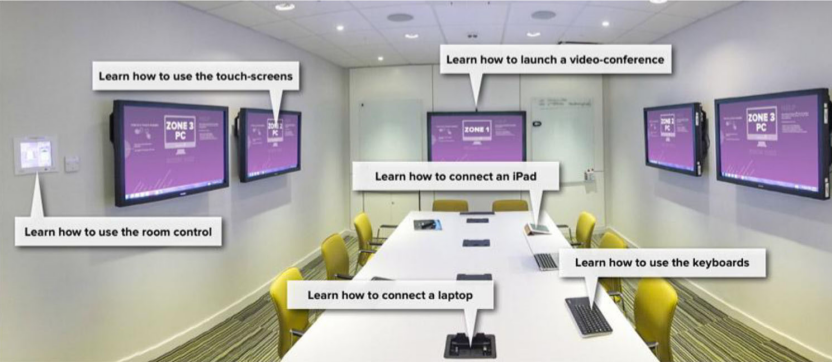
Example ICE meeting room [2]
Another aspect of ICE is the use of very large touch-screen display surfaces. Microsoft has been working on this type of product for a number of years, and it is now commercially available, but very expensive (>$10K). In addition, and advanced ICE meeting room includes interactive whiteboards. An ICE is first of all a functioning meeting room and is used daily for meetings, presentations and teaching. However, it is also a space that brings together cutting edge technologies into a unique configuration. It is a glimpse into the future of meeting rooms and office spaces when multi-screen, multi-touch and multi-user spaces are increasingly common.

Advanced ICE meeting room with table, wall screens, and interactive whiteboards [2]
Workstations
Software developers (generally including members of cross-functional teams or working on individual phases such as analysts, designers, architects, developers. etc.) may use a wide variety of variety of workstation equipment, such as desktop computers and laptops/notebooks. Today, a typical workstation will include dual monitors (for desktops or laptop docking stations), or an external monitor that is combined with the screen on a laptop. A workstation will also typically include a phone and an a desk space or table space (for open environments). Developers, testers, and operations may also use additional monitors.
Larger organizations typically standardize on equipment and operating systems, which reduces IT support costs and simplifies equipment budgeting. However, many of these organizations are slow to upgrade equipment, which is often shortsighted. The increased productivity from a more functional workstation pays for itself fairly quickly. Some smaller companies, such as Smartsheet, allow their software developers to chose their own equipment and operating systems, resulting in a blend of Windows and Mac OS X workstations. This generally may add to IT support costs, but enhances the developer’s productivity, since he or she is more familiar with the equipment and development/design software.

A typical software developer workstation including all of the essentials (dual monitors, phone, Starbucks, and bottled water)
Source https://peoplesofttipster.com/category/how-i-work/
References
[1] International Facility Management Association
[2] David Benyon and Oli Mival. 2015. Blended Spaces for Collaboration. Comput. Supported Coop. Work 24, 2-3 (June 2015), 223-249. DOI=http://dx.doi.org.offcampus.lib.washington.edu/10.1007/s10606-015-9223-8